Communities in Les Misérables#
In this tutorial you find groups of characters in Victor Hugo’s Les Misérables who appear together in the same chapters. You run three community-detection algorithms, score and compare their partitions, draw them, identify the central and the bridging characters of each group, and finish with a dark-theme figure ready for slides.
Goal: split a real network into communities, judge the result with scores and with what you know about the data, and present it in a figure.
Prerequisites:
Your first network, or familiarity with
ag.Graph,NodeMapresults andag.draw.AryaGraph installed; nothing else is needed for this page, which saves SVG and HTML.
The code blocks build on each other: run them in order in one Python session or notebook. The randomized algorithms take a seed, so you get the numbers printed on this page.
Load the co-appearance network#
AryaGraph bundles the classic co-appearance network compiled by Donald Knuth: one node per character, and an edge between two characters who appear in the same chapter, weighted by the number of such chapters.
import aryagraph as ag

les = ag.gen.les_miserables()
print(les)
print(les.attrs["citation"])
strength = les.degree(weight="weight")
print(strength.top(5))
<Graph 'Les Misérables': 77 nodes, 254 edges>
Character co-occurrence in Victor Hugo's novel; D. E. Knuth, The Stanford GraphBase (1993).
[('Valjean', 158), ('Marius', 104), ('Enjolras', 91), ('Courfeyrac', 84), ('Cosette', 68)]
les.degree(weight="weight") sums the weights of each character’s edges, which is called the node’s strength: Valjean shares a chapter with another character 158 times. The result is a NodeMap, a dictionary with helpers such as top(), and you reuse it below for node sizes.
Find communities three ways#
A community is a group of nodes with many edges among themselves and comparatively few to the rest of the graph. AryaGraph offers several algorithms; this tutorial compares three that take different routes:
partitions = {
    "Louvain": ag.alg.louvain_communities(les, seed=0),
    "greedy modularity": ag.alg.greedy_modularity_communities(les, weight="weight"),
    "label propagation": ag.alg.label_propagation_communities(les, weight="weight", seed=0),
}
for name, parts in partitions.items():
    print(f"{name:18} {len(parts):2} communities, sizes {[len(c) for c in parts]}")
Louvain             6 communities, sizes [22, 17, 11, 11, 10, 6]
greedy modularity   5 communities, sizes [33, 17, 11, 10, 6]
label propagation   7 communities, sizes [30, 15, 10, 9, 6, 5, 2]
louvain_communities()Moves nodes one at a time into the neighboring community that raises modularity the most, collapses each community into a single node and repeats on the smaller graph. A final refinement pass re-runs the moves on the finer levels. The node order is random, so it takes a
seed.greedy_modularity_communities()The Clauset–Newman–Moore algorithm starts with every node alone and repeatedly merges the pair of communities whose merge raises modularity the most, until no merge helps. It uses no randomness.
label_propagation_communities()Every node starts with its own label and repeatedly adopts the label carrying the most (weighted) neighbors, until no label changes. It optimizes no score and runs in linear time per sweep, which makes it a quick first look at large graphs.
Every algorithm returns a list of sets of nodes, largest first.
Important
The weight defaults differ: louvain_communities reads the weight attribute unless you pass weight=None, while greedy_modularity_communities and label_propagation_communities ignore weights unless you pass weight="weight". These defaults follow networkx, so code ported from networkx behaves the same. Pass weight explicitly when you compare algorithms.
To see what the default costs here, run the greedy algorithm without weights and score it against the weighted graph:
unweighted = ag.alg.greedy_modularity_communities(les)
print(len(unweighted), round(ag.alg.modularity(les, unweighted), 3))
5 0.473
Ignoring how often characters meet lowers the weighted modularity of the greedy partition from 0.547 (next section) to 0.473.
Score the partitions#
Modularity measures how much more edge weight falls inside communities than you would expect if the edges were rewired at random while keeping every node’s strength. It is 0 for a single community containing everything; Newman and Girvan, who introduced it, report values from about 0.3 to 0.7 for networks with strong community structure. partition_quality() reports it together with two unweighted scores:
for name, parts in partitions.items():
    q = ag.alg.partition_quality(les, parts)
    print(f"{name:18} modularity {q['modularity']:.3f}   "
          f"coverage {q['coverage']:.3f}   performance {q['performance']:.3f}")
Louvain            modularity 0.567   coverage 0.764   performance 0.862
greedy modularity  modularity 0.547   coverage 0.835   performance 0.792
label propagation  modularity 0.544   coverage 0.744   performance 0.821
coverage is the share of edges that fall inside a community;
performance is the share of node pairs classified correctly: linked pairs in the same community plus unlinked pairs in different ones.
Louvain reaches the highest modularity, 0.567. The greedy algorithm gets the highest coverage because its largest community holds 33 of the 77 characters, and a large community swallows many edges. That is why coverage alone is a poor guide: putting every node in one community gives a coverage of 1.
The randomized algorithms can give a different answer for every seed. Try ten:
for seed in range(10):
    lv = ag.alg.louvain_communities(les, seed=seed)
    lp = ag.alg.label_propagation_communities(les, weight="weight", seed=seed)
    q_lv, q_lp = ag.alg.modularity(les, lv), ag.alg.modularity(les, lp)
    print(seed, len(lv), round(q_lv, 4), len(lp), round(q_lp, 4))
0 6 0.5667 7 0.544
1 6 0.5667 6 0.5295
2 6 0.5667 8 0.5644
3 6 0.5658 7 0.544
4 6 0.5658 6 0.5295
5 6 0.5658 7 0.5646
6 6 0.5658 8 0.5644
7 6 0.5658 6 0.5295
8 6 0.5658 6 0.5438
9 6 0.5658 6 0.5295
Louvain finds 6 communities for every seed, with modularity 0.5667 or 0.5658. Label propagation varies more: between 6 and 8 communities, with modularity from 0.5295 to 0.5646. When a result matters, run a randomized algorithm with several seeds and report the spread, or keep the partition with the highest modularity.
Choose the scale#
Modularity has a resolution parameter γ. Values below 1 favor fewer, larger communities; values above 1 favor more, smaller ones:
for gamma in (0.5, 1.0, 1.5, 2.0):
    parts = ag.alg.louvain_communities(les, resolution=gamma, seed=0)
    print(f"resolution {gamma}: {len(parts)} communities, sizes {[len(c) for c in parts]}")
levels = ag.alg.louvain_hierarchy(les, seed=0)
print([len(level) for level in levels])
resolution 0.5: 5 communities, sizes [35, 17, 10, 9, 6]
resolution 1.0: 6 communities, sizes [22, 17, 11, 11, 10, 6]
resolution 1.5: 8 communities, sizes [20, 15, 11, 11, 10, 6, 2, 2]
resolution 2.0: 10 communities, sizes [14, 11, 10, 10, 9, 9, 6, 4, 2, 2]
[10, 6]
louvain_hierarchy() shows the levels of a single Louvain run: 10 communities after the first pass, merged into 6 by the second. There is no single correct scale; pick the one that answers your question, and compare partitions only at the same resolution.
Read the communities#
Print the members of each Louvain community to check that the groups make sense:
louvain = partitions["Louvain"]
for i, members in enumerate(louvain):
    print(i, sorted(members))
0 ['BaronessT', 'Cosette', 'Fauchelevent', 'Gervais', 'Gillenormand', 'Gribier', 'Isabeau', 'Javert', 'Labarre', 'LtGillenormand', 'Marius', 'MlleGillenormand', 'MlleVaubois', 'MmeDeR', 'MmePontmercy', 'MotherInnocent', 'Pontmercy', 'Scaufflaire', 'Toussaint', 'Valjean', 'Woman1', 'Woman2']
1 ['Bahorel', 'Bossuet', 'Child1', 'Child2', 'Combeferre', 'Courfeyrac', 'Enjolras', 'Feuilly', 'Gavroche', 'Grantaire', 'Joly', 'Jondrette', 'Mabeuf', 'MmeBurgon', 'MmeHucheloup', 'MotherPlutarch', 'Prouvaire']
2 ['Blacheville', 'Dahlia', 'Fameuil', 'Fantine', 'Favourite', 'Listolier', 'Marguerite', 'Perpetue', 'Simplice', 'Tholomyes', 'Zephine']
3 ['Anzelma', 'Babet', 'Boulatruelle', 'Brujon', 'Claquesous', 'Eponine', 'Gueulemer', 'Magnon', 'MmeThenardier', 'Montparnasse', 'Thenardier']
4 ['Champtercier', 'Count', 'CountessDeLo', 'Cravatte', 'Geborand', 'MlleBaptistine', 'MmeMagloire', 'Myriel', 'Napoleon', 'OldMan']
5 ['Bamatabois', 'Brevet', 'Champmathieu', 'Chenildieu', 'Cochepaille', 'Judge']
Readers of the novel will recognize the story lines: Valjean, Cosette and Marius with the Gillenormand family (0); the students of the barricade with Gavroche (1); Fantine and Tholomyès’s circle of friends (2); the Thénardiers and the Patron-Minette gang (3); Bishop Myriel’s household in Digne (4); and the Champmathieu trial (5). The algorithm found these groups from co-appearance counts alone.
Draw the communities#
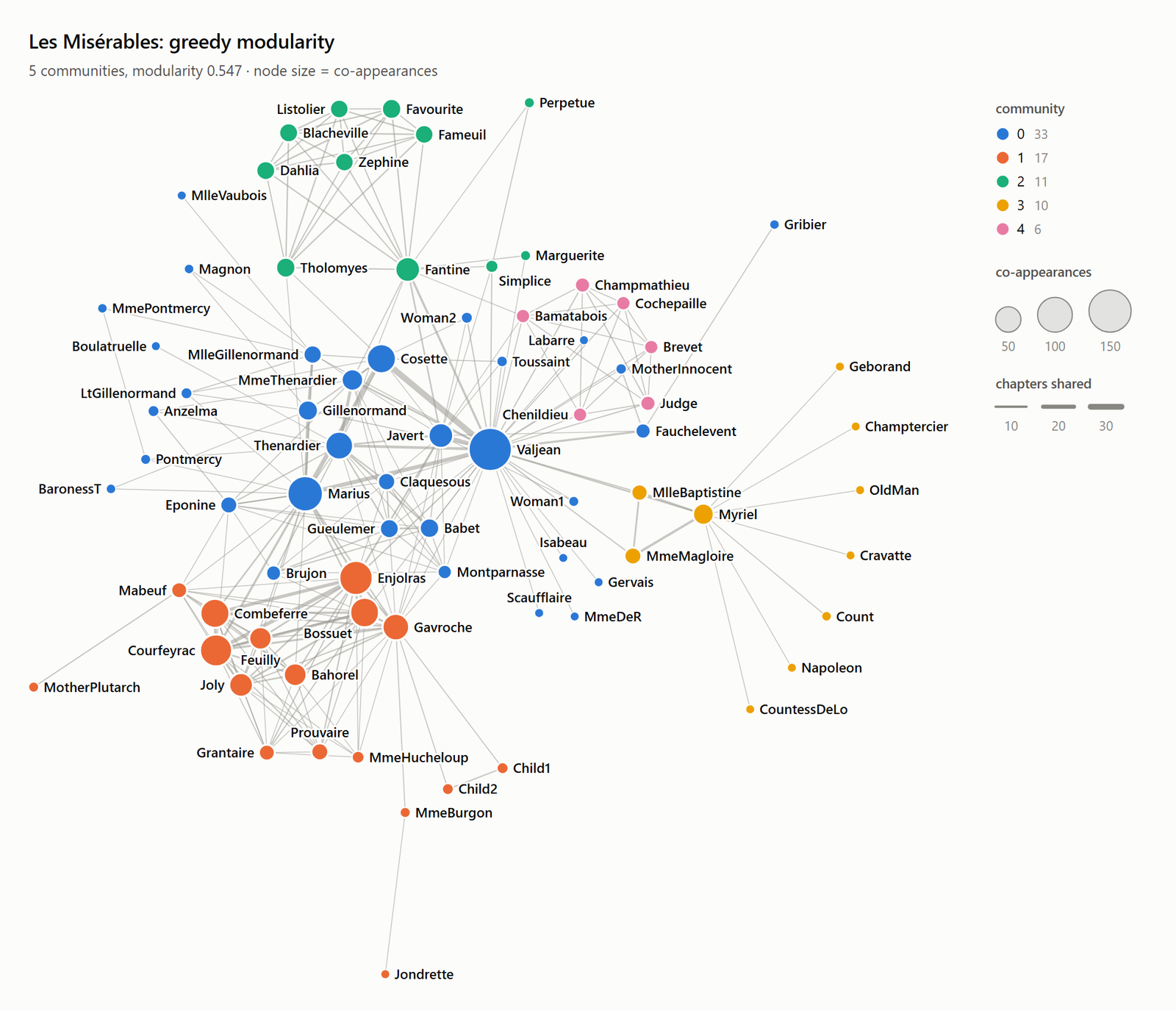
community_labels() turns the list of sets into a {node: index} map, with 0 for the largest community. Pass it to draw() as a categorical color:
labels = ag.alg.community_labels(louvain)
print(labels["Valjean"], labels["Javert"], labels["Enjolras"])
fig = ag.draw(
    les,
    node_color=ag.by(labels, kind="categorical", title="community"),
    node_size=ag.by(strength, title="co-appearances"),
    edge_width=ag.by("weight", title="chapters shared"),
    title="Les Misérables: Louvain",
    subtitle=f"{len(louvain)} communities, modularity {ag.alg.modularity(les, louvain):.3f}"
             " · node size = co-appearances",
)
fig.save("lesmis_louvain.svg")
print(fig)
0 0 1
<Figure 990×851: 77 nodes, 254 edges, stress layout, theme 'light'>
kind="categorical" matters here: community indices are integers, and without it they would be read as numbers on a sequential color scale. The layout is computed from the graph alone, with a fixed default seed, so drawing the three partitions gives three figures with identical node positions. Switch between the tabs to compare them:


Find the central characters of each community#
Centrality inside a community answers a different question from centrality in the whole graph: who holds this group together? Take the subgraph of each community and rank its members by the strength they have inside it:
for i, members in enumerate(louvain):
    inside = les.subgraph(v for v in les if v in members).degree(weight="weight")
    hub, s = inside.top(1)[0]
    print(f"{i}: {len(members):2} characters, hub {hub:<11} "
          f"{s:3} of {strength[hub]:3} co-appearances inside")
0: 22 characters, hub Valjean      91 of 158 co-appearances inside
1: 17 characters, hub Courfeyrac   74 of  84 co-appearances inside
2: 11 characters, hub Fantine      29 of  47 co-appearances inside
3: 11 characters, hub Thenardier   38 of  61 co-appearances inside
4: 10 characters, hub Myriel       26 of  31 co-appearances inside
5:  6 characters, hub Judge        11 of  14 co-appearances inside
Communities are Python sets, so the code passes each one to subgraph() in graph order; top() keeps the first node on ties, and graph order makes that choice reproducible. That matters in community 5, where the Judge and Champmathieu tie at 11. The ratios tell two kinds of hub apart. Courfeyrac (74 of 84) and Myriel (26 of 31) live almost entirely inside their group. Valjean spends 67 of his 158 co-appearances with other groups, so he is a hub of his community and a link between communities.
To find those links directly, compute the share of each character’s strength that goes to other communities, and compare it with betweenness centrality in the whole graph:
outside = {}
for v in les:
    out = sum(d["weight"] for u, d in les.adj[v].items() if labels[u] != labels[v])
    outside[v] = out / strength[v]
bridges = sorted((v for v in les if strength[v] >= 20), key=outside.get, reverse=True)[:5]
print([(v, round(outside[v], 2), labels[v]) for v in bridges])
bc = ag.alg.betweenness_centrality(les)
print([(v, round(b, 3)) for v, b in bc.top(5)])
[('Javert', 0.53, 0), ('Valjean', 0.42, 0), ('Marius', 0.41, 0), ('MmeThenardier', 0.41, 3), ('Fantine', 0.38, 2)]
[('Valjean', 0.57), ('Myriel', 0.177), ('Gavroche', 0.165), ('Marius', 0.132), ('Fantine', 0.13)]
The filter strength >= 20 leaves out minor characters, for whom one or two chapters would swing the share. Among the others, Javert has the most outward-facing ties: 53% of his co-appearances are with characters outside his community. Betweenness measures how often a node lies on the shortest paths between other nodes, and it singles out Valjean: averaged over all pairs of other characters, 57% of the shortest paths between them pass through him. Myriel ranks second on betweenness although only 5 of his 31 co-appearances cross communities: seven characters of his community (Napoleon, the Count, Cravatte and four others) appear with nobody else, so every shortest path from them to the rest of the story passes through Myriel.
A dark-theme figure#
The same drawing call makes a figure for slides or a dark website. Size nodes by betweenness to show who connects the story, and switch the theme:
dark = ag.draw(
    les,
    node_color=ag.by(labels, kind="categorical", title="community"),
    node_size=ag.by(bc, title="betweenness"),
    edge_width=ag.by("weight", title="chapters shared"),
    theme="dark",
    title="Les Misérables",
    subtitle="Louvain communities · node size = betweenness centrality",
)
dark.save("lesmis_dark.svg")
dark.save("lesmis_dark.html")
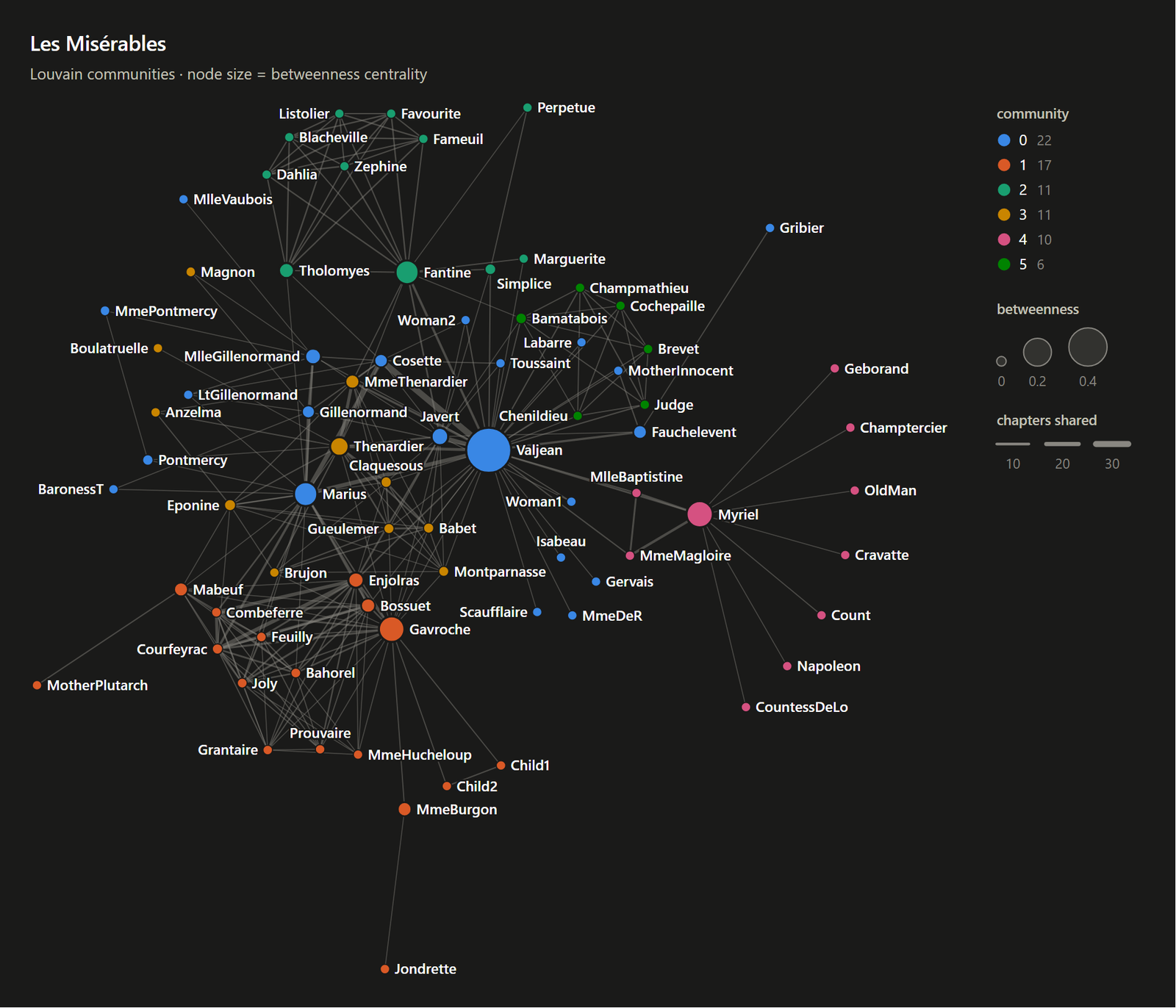
The dark theme uses its own color steps, tuned for contrast on a dark background. Open the interactive version to hover over characters and search by name.#
Next steps#
Algorithms in the user guide covers the community, centrality and structure functions.
Styling covers encodings, palettes and themes.
Les Misérables: a character network is a case study on the same network.
Influence and cascades uses the same network to choose the characters who spread a rumor furthest.